The internet has become an essential part of everyday life. We use it to communicate, shop, work, manage finances, store photos, access healthcare, and connect with friends and family. But as our digital lives continue to grow, so does the risk of becoming a victim of a cyber attack.
Common cyber threats can affect anyone. You don’t have to run a large company or possess valuable corporate secrets to become a target. Cybercriminals frequently use automated attacks, scams, malicious software, and stolen credentials to target large numbers of people at once.
A successful attack can have serious consequences. You could lose access to an important account, have personal information stolen, experience financial fraud, or even become the victim of identity theft.
Understanding the most common cybersecurity threats is one of the best ways to protect yourself.
In this guide, we’ll explore the biggest cyber threats you should know about, explain how they work, and show how they can affect your everyday life.
What Are Cyber Threats?
A cyber threat is any potential danger that can compromise a computer system, network, device, application, account, or digital information.
Cyber threats can come from individuals, organized criminal groups, insiders, hacktivists, or other malicious actors.
Their goals can vary.
Some attackers want money. Others want sensitive information, access to systems, disruption, espionage, or simply the ability to exploit compromised devices.
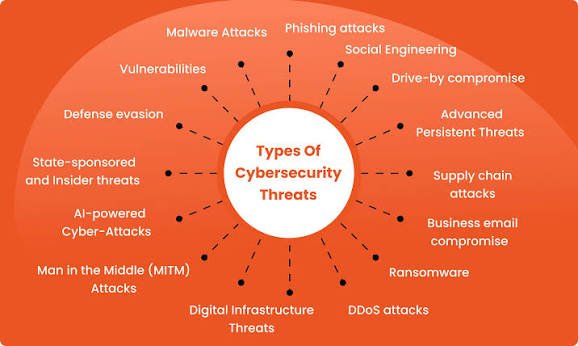
Common examples include:
- Phishing attacks
- Malware
- Ransomware
- Identity theft
- Password attacks
- Social engineering
- Data breaches
- Account takeovers
- Denial-of-service attacks
- Supply-chain attacks
The important thing to remember is that cyber threats aren’t limited to computers. Your smartphone, email account, social media profile, online banking account, smart home devices, and cloud storage can all become potential targets.
1. Phishing Attacks
Phishing is one of the most common cybersecurity threats affecting internet users.
A phishing attack attempts to trick you into providing information or performing an action that benefits the attacker.
You might receive an email that appears to come from your bank, employer, delivery company, streaming service, or another familiar organization.
The message may tell you that:
- Your account has been locked.
- A payment has failed.
- You need to verify your identity.
- A package is waiting for you.
- Your subscription is about to expire.
- You have won a prize.
The message usually contains a link or attachment.
Clicking the link could take you to a fake website designed to steal your username, password, payment details, or other information.
How phishing affects you
A successful phishing attack can result in:
- Stolen passwords
- Financial fraud
- Identity theft
- Malware infections
- Compromised email accounts
- Social media account takeovers
How to protect yourself
Don’t automatically trust a message because it contains familiar branding.
Avoid clicking unexpected links, and access important accounts through their official apps or websites instead.
If a message creates a strong sense of urgency, stop and verify it independently.
2. Malware
Malware is short for malicious software.
It refers to software intentionally designed to damage systems, steal information, disrupt operations, or provide unauthorized access.
There are many types of malware, including:
- Viruses
- Trojans
- Spyware
- Worms
- Keyloggers
- Infostealers
- Botnet malware
Malware can reach devices through malicious downloads, email attachments, compromised websites, fake applications, malicious advertisements, or other deceptive methods.
How malware affects you
Depending on its type, malware could:
- Steal passwords
- Monitor your activity
- Capture sensitive information
- Delete or encrypt files
- Slow down your device
- Allow remote access
- Steal financial information
The consequences can range from inconvenience to significant financial and privacy damage.
How to protect yourself
Keep your operating system and applications updated. Download software from trusted sources and avoid suspicious attachments, pirated applications, and unknown browser extensions.
Security software can provide another layer of protection, but safe online behavior remains important.
3. Ransomware
Ransomware is a particularly damaging type of malware.
Instead of simply stealing information, ransomware can encrypt files or disrupt systems and then demand payment from the victim.
Businesses are frequent targets, but individuals can also be affected.
Imagine losing access to years of photographs, personal documents, tax records, or other important files.
How ransomware affects you
A ransomware attack can cause:
- Loss of access to files
- Business interruption
- Financial losses
- Data exposure
- Recovery costs
- Stress and disruption
Some attackers also steal information before encrypting systems and then threaten to publish the data if their demands aren’t met.
How to protect yourself
The most important defense is reliable backup.
Keep important files backed up in a way that attackers cannot easily modify or delete. Test your backups regularly to make sure you can actually restore your information.
Keep devices updated and be cautious with unexpected links and attachments.
4. Identity Theft
Identity theft occurs when someone obtains and misuses your personal information, often for fraudulent purposes.
Criminals may collect information from data breaches, phishing attacks, social media, malware, stolen documents, or other sources.
They may attempt to use your information to open accounts, make fraudulent purchases, impersonate you, or conduct other forms of fraud.
How identity theft affects you
Identity theft can result in:
- Financial losses
- Fraudulent accounts
- Damaged credit
- Loss of privacy
- Legal or administrative complications
- Long recovery processes
One reason identity theft can be difficult to prevent is that criminals don’t always need a complete identity to begin an attack.
Small pieces of information can be combined from multiple sources.
How to reduce your risk
Be careful about the personal information you share online.
Use strong authentication on important accounts and monitor financial statements and account activity for suspicious transactions.
5. Password Attacks
Passwords remain one of the most important components of online security.
Unfortunately, they are also frequently targeted.
Attackers may use stolen passwords, automated guessing tools, credential stuffing, or social engineering to gain access to accounts.
One of the biggest mistakes users make is reusing the same password across multiple websites.
If one service suffers a breach and your password is exposed, criminals may try that same combination on other websites.
How password attacks affect you
A compromised password could give an attacker access to:
- Social media
- Shopping accounts
- Cloud storage
- Financial services
- Work systems
Your email account is especially important because it can potentially be used to reset passwords for other accounts.
How to protect your passwords
Use a unique password or passphrase for every important account.
A password manager can help you generate and securely store unique credentials.
Most importantly, enable multifactor authentication wherever possible.
6. Social Engineering
Social engineering is different from a traditional technical attack.
Instead of exploiting a software vulnerability, the attacker exploits human behavior.
The criminal may pretend to be a coworker, family member, bank employee, customer-service representative, or government official.
The objective is to convince you to reveal information, transfer money, click a link, or perform another action.
Why social engineering works
People naturally trust familiar voices, authority figures, and urgent requests.
Attackers take advantage of that behavior.
Modern technology has made social engineering even more concerning because criminals can potentially use publicly available information and artificial intelligence to create highly convincing messages and impersonations.
How to protect yourself
Verify unusual requests through a separate communication channel.
For example, if someone claiming to be your manager asks you to make an urgent payment, call them using a trusted number rather than simply replying to the original message.
7. Data Breaches
A data breach occurs when sensitive information is accessed or exposed without authorization.
Large organizations can hold enormous quantities of customer information.
A breach could expose:
- Names
- Email addresses
- Phone numbers
- Passwords
- Financial information
- Account details
- Personal records
You may become affected even if you did nothing wrong.
If a company you use experiences a data breach, information associated with your account could potentially be exposed.
How data breaches affect you
The immediate breach may not cause direct financial damage.
However, exposed information can later be used in phishing, identity theft, account takeover, and targeted scams.
That’s why you should pay attention to breach notifications from companies you use.
If a password has potentially been exposed, change it—especially if you have reused it elsewhere.
8. Account Takeover
Account takeover occurs when an attacker gains unauthorized access to an account.
The account could belong to an email provider, social network, online store, financial service, or another platform.
Once inside, the attacker may change the password, steal information, impersonate the victim, or use the account to attack other people.
How account takeover affects you
A compromised social media account could be used to scam your contacts.
A compromised email account could be used to reset other passwords.
A compromised shopping account could expose stored personal or payment information.
This is why protecting your primary email account is particularly important.
9. Online Shopping Scams
Online shopping has created new opportunities for consumers—and scammers.
Fraudulent websites and social media advertisements can imitate legitimate businesses.
You might encounter a website selling popular products at extremely low prices.
After placing an order, several things could happen:
- The product never arrives.
- You receive a counterfeit product.
- Your payment information is stolen.
- Your personal information is collected.
How to stay safe while shopping online
Research unfamiliar stores before making a purchase.
Be skeptical of extremely low prices and urgent “limited-time” offers.
Check the website address carefully and avoid entering payment information into unfamiliar websites without verifying their legitimacy.
10. Smishing and Vishing
Phishing doesn’t happen only through email.
Smishing refers to phishing through text messages, while vishing generally refers to voice-based phishing.
A scammer might call claiming to be from your bank and tell you that suspicious activity has been detected.
They may ask you to “verify” your identity by providing a password, security code, or other sensitive information.
Remember that legitimate organizations generally have established procedures for handling account issues. An unexpected caller demanding sensitive information should be treated cautiously.
11. DDoS Attacks
Distributed denial-of-service, or DDoS, attacks attempt to overwhelm an online service with large amounts of traffic.
These attacks are more commonly associated with organizations, websites, and online services than individual users.
However, consumers can still be affected when services they rely on become unavailable.
For example, an attack against an online service could prevent customers from accessing an application, website, or digital platform.
This highlights an important point:
Cybersecurity isn’t only about protecting information. It’s also about maintaining availability.
12. Insider Threats
An insider threat comes from someone who already has legitimate access to an organization’s systems or information.
This could involve an employee, contractor, partner, or other authorized user.
Insider threats can be intentional or accidental.
An employee might accidentally send sensitive information to the wrong person, use an insecure device, or fall victim to a phishing attack.
Businesses can reduce this risk through least-privilege access, monitoring, employee education, and strong security policies.
How Cyber Threats Affect Your Everyday Life
Cyber attacks can have consequences beyond computers and technology.
Financial impact
You could lose money through fraudulent transactions, scams, stolen payment information, or unauthorized purchases.
Privacy impact
Personal information can be exposed, sold, or used for further attacks.
Emotional impact
Victims may experience stress, embarrassment, fear, or anxiety after losing control of an account or becoming a victim of fraud.
Professional impact
A compromised account or infected device can affect your ability to work and may potentially expose employer information.
Reputation impact
Attackers can use compromised social media or email accounts to impersonate victims and send malicious or fraudulent messages to their contacts.
Warning Signs of a Cyber Attack
Recognizing suspicious activity early can help limit damage.
Watch for:
- Unexpected password-reset emails
- Unknown account logins
- Unusual bank transactions
- New applications you didn’t install
- Unexpected password changes
- Messages sent from your account without your knowledge
- Slow or unusual device behavior
- Security alerts you don’t recognize
- Friends reporting suspicious messages from your account
If something looks unusual, investigate it rather than ignoring it.
How to Protect Yourself From Common Cyber Threats
You don’t need to become a cybersecurity professional to significantly improve your online security.
Start with these habits:
Use unique passwords
Don’t use the same password for multiple important accounts.
Enable multifactor authentication
MFA adds an additional security layer beyond your password.
Keep software updated
Install security updates for your operating system, browser, applications, and connected devices.
Be skeptical of unexpected messages
Don’t click links simply because a message appears legitimate.
Secure your email
Use a strong, unique password and MFA for your primary email account.
Back up important files
Maintain reliable backups of photographs, documents, and other important information.
Monitor your accounts
Regularly check financial accounts, email activity, and login histories where available.
Limit personal information online
Avoid publicly sharing information that could help criminals answer security questions or impersonate you.
What Should You Do After a Cyber Attack?
If you believe you’ve been hacked, acting quickly is important.
Start by securing the affected account.
Change the password and enable multifactor authentication.
If you used the same password on other websites, change those passwords as well.
Review recent account activity for unauthorized actions.
If financial information has been compromised, contact your financial institution through an official communication channel.
For serious identity theft or fraud, consider reporting the incident to the appropriate authorities.
Most importantly, don’t continue using a compromised account without taking steps to secure it.
The Future of Cyber Threats
Cyber threats will continue to evolve as technology changes.
Artificial intelligence, cloud computing, connected devices, cryptocurrency, remote work, and increasingly digital lifestyles all create new opportunities for cybercriminals.
At the same time, cybersecurity technologies are improving.
Security teams are using automation, behavioral analysis, threat intelligence, artificial intelligence, and stronger identity controls to detect and prevent attacks.
For individuals, however, the fundamentals remain extremely important.
Strong passwords, multifactor authentication, software updates, cautious online behavior, and regular backups can prevent or reduce the impact of many common attacks.
Conclusion
Common cyber threats can affect anyone, regardless of age, occupation, technical knowledge, or financial status.
Phishing can steal your passwords. Malware can compromise your device. Ransomware can lock your files. Identity theft can damage your finances and reputation. Social engineering can manipulate you into making a mistake, while data breaches can expose information you trusted a company to protect.
The good news is that understanding these threats gives you an advantage.
You don’t need perfect cybersecurity. You need consistent cybersecurity habits.
Use unique passwords, enable multifactor authentication, keep your software updated, be cautious with unexpected messages, protect your personal information, monitor your accounts, and maintain reliable backups.
The internet is an incredibly useful part of modern life. The goal isn’t to avoid it.
The goal is to understand the risks and use it safely.