The internet has become an essential part of everyday life. We use it to communicate, shop, work, study, manage finances, make appointments, share photographs, and stay connected with people around the world.
But every online activity can leave behind information about who you are.
Your name, email address, phone number, location, photographs, account details, shopping history, and other personal information can all contribute to your digital identity. While much of this information is used for legitimate purposes, criminals can also use stolen information to impersonate people, access accounts, commit fraud, or target victims with convincing scams.
Keeping your identity safe online may sound complicated, but it doesn’t have to be.
You don’t need advanced technical skills to improve your security. Simple habits can make a significant difference.
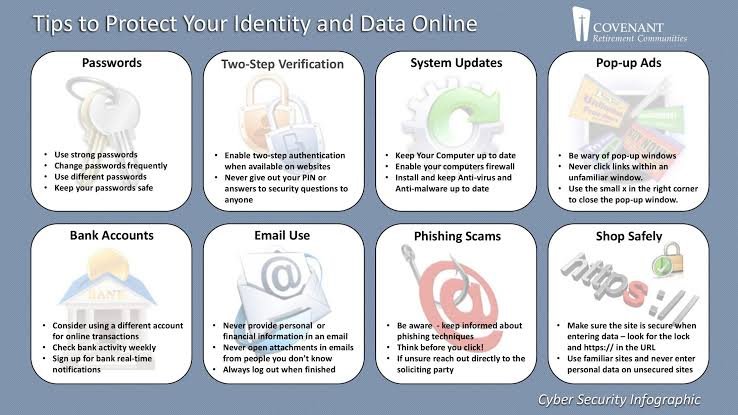
Using strong passwords, enabling multifactor authentication, being careful about what you share, recognizing scams, protecting your devices, and monitoring your accounts are all practical ways to reduce your risk.
Understand What Your Digital Identity Includes
Your online identity is made up of more than just your name.
It can include your email addresses, phone numbers, photographs, social media profiles, usernames, location information, financial details, employment information, and other personal data.
Some information may seem harmless on its own.
However, criminals can combine small pieces of information from different sources to build a detailed picture of a person.
For example, a public social media profile might reveal your name, workplace, hometown, family members, and birthday.
When combined with information from another source, those details could potentially help a criminal impersonate you or create a convincing scam.
Understanding the value of your information is the first step toward protecting it.
Share Less Personal Information
One of the easiest ways to protect your identity is to reduce unnecessary information sharing.
Before filling out an online form, ask yourself whether every requested detail is actually necessary.
You may be asked for your full name, phone number, address, date of birth, or other information.
Some services genuinely need these details.
Others may not.
Avoid providing information simply because a website asks for it.
The less personal information you place online, the less information there is for criminals to discover or misuse.
Use Strong and Unique Passwords
Your passwords are one of the main defenses protecting your digital identity.
Weak passwords can make accounts easier to compromise.
Using the same password across multiple websites creates another serious risk.
If criminals obtain your password from one service, they may try using the same credentials on your email, social media, shopping, or financial accounts.
Use a different password for every important account.
Make passwords long and difficult to guess.
Avoid obvious personal information such as names, birthdays, addresses, or common phrases.
A password manager can make it easier to create and manage unique passwords.
Protect Your Email Account
Your email account should be one of your highest security priorities.
It often serves as the recovery method for other online accounts.
If someone gains access to your email, they may be able to request password resets and access other services connected to it.
Your inbox may also contain sensitive conversations, documents, receipts, travel information, and financial details.
Use a unique password for your email account.
Enable multifactor authentication.
Review recovery information.
Check active sessions and connected devices.
Treat your email account as the central hub of your digital identity.
Enable Multifactor Authentication
Multifactor authentication provides an additional layer of protection beyond your password.
When MFA is enabled, you may need to confirm your identity through an authentication app, security key, biometric verification, or another method.
This means a stolen password may not be enough for someone to access your account.
Turn on MFA for your most important accounts.
Start with email, banking, cloud storage, social media, and work accounts.
It may take a little longer to sign in, but the additional protection can be worthwhile.
Be Careful With Phishing Messages
Phishing is one of the most common ways criminals attempt to steal personal information.
A phishing message may look like it came from a bank, employer, online store, delivery company, social media platform, or government organization.
It may ask you to click a link, confirm your identity, update payment information, or reset your password.
The message may create urgency by claiming something bad will happen if you don’t act immediately.
Don’t let pressure make the decision for you.
Instead, verify the message independently.
If you need to access an account, open the official app or website directly instead of using the link in the message.
Check Links Before Clicking
Links can take you to legitimate websites, but they can also lead to fake pages designed to steal information.
Be especially careful with unexpected links.
Look at where the link came from.
Consider whether the message makes sense.
If you’re unsure, don’t click it.
For important accounts, navigate directly to the official website or use the official application.
A few extra seconds can prevent you from entering your password into a fraudulent website.
Never Share Security Codes
Authentication codes are designed to protect your accounts.
Criminals sometimes try to convince victims to share these codes.
They may pretend to be bank employees, technical-support representatives, coworkers, or other trusted people.
If someone asks for a code that was sent to your phone or authentication application, don’t provide it.
If you receive a code you didn’t request, check your account directly.
It could indicate that someone is attempting to sign in.
Think Carefully Before Posting on Social Media
Social media can be a valuable source of personal information.
Photos, posts, comments, and profiles can reveal details about your identity and daily life.
Avoid publicly sharing unnecessary information such as your home address, phone number, travel plans, financial information, or exact location.
Review your privacy settings regularly.
Think about who can see your content.
Remember that information posted online can be copied or shared even if you later delete it.
Be Careful With Birthdays and Personal Details
Information such as birthdays, hometowns, family names, and workplaces may seem harmless.
However, these details can sometimes be used to answer security questions or create more convincing impersonation attempts.
Avoid making sensitive personal details unnecessarily public.
When an online service asks for information, consider whether you need to provide the most detailed version.
Protect Your Physical Documents
Identity protection isn’t limited to the internet.
Physical documents can contain information that criminals may use for fraud.
Be careful with passports, identification documents, financial statements, bills, and other paperwork containing personal information.
Don’t leave sensitive documents where strangers can easily see them.
When disposing of documents containing sensitive information, use an appropriate method to prevent other people from recovering the information.
Keep Your Devices Updated
Your smartphone and computer contain important parts of your digital identity.
Keeping them updated can help protect them against known security vulnerabilities.
Install operating system and application updates promptly.
Keep your browser updated.
Enable automatic updates when appropriate.
Don’t ignore security notifications simply because they are inconvenient.
Lock Your Devices
A lost or stolen phone can provide access to an enormous amount of personal information.
Protect your devices with strong screen locks.
Use a secure passcode or password.
Enable biometric authentication when appropriate.
Turn on device-finding features.
These measures can help prevent someone who finds or steals your device from immediately accessing your accounts and personal information.
Be Careful With Public Computers
Avoid entering sensitive information on public or shared computers whenever possible.
You don’t know what software may be installed on a computer you don’t control.
If you must use one, never save your passwords.
Don’t allow the browser to remember your information.
Sign out of your accounts before leaving.
If you entered sensitive information on an untrusted computer, consider changing the relevant password later from a trusted device.
Be Careful With Public Wi-Fi
Public Wi-Fi can be convenient, but not every network is trustworthy.
Avoid entering highly sensitive information on unfamiliar networks unless you have appropriate security protections.
Keep your device updated.
Pay attention to browser warnings.
When possible, use a trusted network or mobile connection for sensitive activities.
Secure Your Home Wi-Fi
Your home network is an important part of your digital security.
Change default router administrator credentials.
Use a strong Wi-Fi password.
Keep your router firmware updated.
Use modern security settings supported by your equipment.
If your router provides a guest network, consider using it for visitors and devices that don’t need access to your main network.
Be Careful With Online Shopping
Online shopping can expose information about your identity, address, purchasing habits, and payment methods.
Before buying from an unfamiliar website, research the seller.
Check the website address carefully.
Be cautious about unrealistic discounts and aggressive sales tactics.
Don’t enter personal or payment information into a website simply because it looks professional.
If something seems suspicious, find another seller.
Monitor Your Financial Accounts
Regularly checking your financial accounts can help you identify suspicious activity.
Look for unfamiliar transactions.
Enable account notifications when available.
Review statements regularly.
If you see something you don’t recognize, contact your financial institution using an official communication method.
Don’t use contact information provided in a suspicious message.
Be Careful With Fake Customer Support
Scammers can impersonate customer-support representatives.
They may contact you by phone, email, social media, or through fake pop-up messages.
They might claim that your account has been compromised or that your computer has a serious problem.
They may then ask for passwords, authentication codes, payment information, or remote access.
Don’t provide sensitive information to an unexpected caller.
Instead, contact the organization directly through its official website or application.
Watch Out for Impersonation Scams
Criminals may use information they find online to impersonate someone you know.
You might receive a message that appears to come from a friend, relative, coworker, or employer.
The message could ask for money or sensitive information.
If the request is unusual, verify it through another communication method.
Don’t assume a familiar name or profile picture proves who sent the message.
Be Careful With QR Codes
QR codes are increasingly common.
They can be found on menus, posters, advertisements, packages, and payment instructions.
However, criminals can use malicious QR codes to direct people to fraudulent websites.
After scanning a QR code, check the destination before entering personal information or payment details.
If the website looks suspicious, close it.
Treat QR codes with the same caution you would give an unexpected link.
Limit App Permissions
Applications can sometimes access sensitive information on your device.
Review the permissions they request.
Consider whether each permission is necessary.
If an application doesn’t need access to your location, microphone, camera, contacts, or photographs, consider removing that permission.
Delete applications you no longer use.
This can help reduce unnecessary exposure of personal information.
Be Careful With AI and Online Tools
Online AI services and other digital tools can be useful for work, research, education, and creativity.
However, don’t automatically paste sensitive information into them.
Avoid sharing passwords, financial details, private identification information, confidential documents, or other sensitive material unless you understand how the service handles the information and are authorized to provide it.
Think about the sensitivity of the information before submitting it.
Delete Old Online Accounts
Old accounts can contain information you may have forgotten about.
If you no longer use a service, consider deleting the account.
Reducing the number of accounts connected to your identity can reduce your overall digital footprint.
For accounts you need to keep, make sure they have strong passwords and current security settings.
Review Connected Applications
Over time, you may give different applications permission to access your online accounts.
Some of these connections may no longer be necessary.
Review the applications connected to your email, social media, cloud storage, and other important accounts.
Remove access for services you don’t recognize or no longer use.
Be Careful With Online Quizzes
Online quizzes can be entertaining, but some may request surprisingly personal information.
Questions about your favorite childhood pet, hometown, school, birthday, or other personal details may reveal information that could potentially be useful for account recovery or social engineering.
Before participating, consider what information you’re being asked to provide.
You don’t have to answer every question.
Don’t Trust Unexpected Phone Calls
A phone call can be just as dangerous as an email.
Scammers may pretend to be from your bank, employer, government agency, technology company, or another trusted organization.
They may ask for personal information or create a sense of urgency.
Don’t assume the caller is legitimate because they know some information about you.
End the call and contact the organization using a trusted phone number.
Be Skeptical of Unexpected Money Requests
If someone suddenly asks you for money, verify the request.
This is especially important when the request comes from someone you know but the circumstances seem unusual.
Scammers can compromise accounts or impersonate people.
Contact the person through another method.
Never let urgency prevent you from verifying where your money is going.
Back Up Important Information
Identity protection also involves protecting the information stored on your devices.
Back up important photographs, documents, and other files.
Keep multiple copies of information that would be difficult to replace.
Backups can help you recover from device failure, theft, accidental deletion, or malicious software.
Check your backups regularly to make sure they work.
Watch for Data Breach Notifications
Sometimes your personal information may be exposed because a company you use experiences a data breach.
If you receive a legitimate notification that your information may have been affected, take the recommended steps.
Change affected passwords.
If the password was reused elsewhere, change it on those accounts too.
Be cautious about suspicious messages that may appear after a breach.
Criminals sometimes use known incidents to make phishing attempts more convincing.
Monitor Your Online Presence
Search for your name occasionally to see what information is publicly available about you.
You may discover old profiles, outdated accounts, public photographs, or other information you forgot existed.
This can give you a better understanding of your digital footprint.
Where possible, remove information you no longer want to be public.
Don’t Assume You’re Too Small to Target
Some people believe cybercriminals only target large companies or wealthy individuals.
That’s not necessarily true.
Automated attacks can target huge numbers of people at once.
Criminals may also target individuals based on opportunity.
Your personal information may have value even if you don’t consider yourself an important target.
Basic identity protection is worthwhile for everyone.
What to Do If You Think Your Identity Has Been Compromised
If you believe someone has stolen or misused your personal information, don’t ignore the situation.
Start by securing your accounts.
Change compromised passwords.
Change any other accounts that use the same passwords.
Enable multifactor authentication.
Review recent account activity.
Check connected devices and applications.
If financial information has been affected, contact your financial institution through an official channel.
Keep records of suspicious activity and the actions you take.
Acting quickly can help reduce the potential damage.
Make Identity Protection a Routine
Keeping your identity safe isn’t something you do once.
Your digital footprint changes constantly.
You create new accounts, install new applications, make purchases, post information, and connect new devices.
Take time every few months to review your digital security.
Check your important passwords.
Review privacy settings.
Remove unnecessary applications.
Review account permissions.
Check recent login activity.
Delete accounts you no longer use.
These small actions can help you maintain better control over your identity.
Conclusion
Keeping your identity safe online doesn’t require complicated technology.
It starts with simple habits.
Share less unnecessary personal information. Use strong and unique passwords. Enable multifactor authentication. Protect your email account. Keep your devices updated and locked.
Be careful with links, attachments, QR codes, online forms, phone calls, and unexpected requests for information or money.
Review your social media privacy settings and app permissions.
Monitor important financial and online accounts.
Delete old accounts and remove unnecessary third-party access.
Most importantly, learn to slow down when something doesn’t feel right.
Cybercriminals often rely on urgency, fear, trust, and curiosity to persuade people to make quick decisions. Taking a moment to verify a message, website, caller, or request can prevent many common identity-related scams.
Your identity is valuable, and protecting it is an ongoing process.
You don’t need to avoid the internet to stay safer online. By making thoughtful choices about what you share, securing your accounts, protecting your devices, and staying alert to suspicious activity, you can significantly reduce the chances of someone misusing your personal information.
In a connected world, good digital habits are one of the simplest and most effective ways to protect who you are online.