The internet has become part of almost everything we do. We use smartphones to communicate, computers to work, websites to shop, apps to manage finances, and cloud services to store important files. While digital technology makes life easier, it also creates new risks.
Cybercriminals are constantly looking for ways to steal passwords, access accounts, collect personal information, spread malware, and trick people into giving away sensitive data.
The good news is that protecting yourself online does not have to be complicated.
You don’t need to be a cybersecurity expert to improve your digital security. A few simple habits can make a significant difference and help protect your accounts, devices, personal information, and finances.
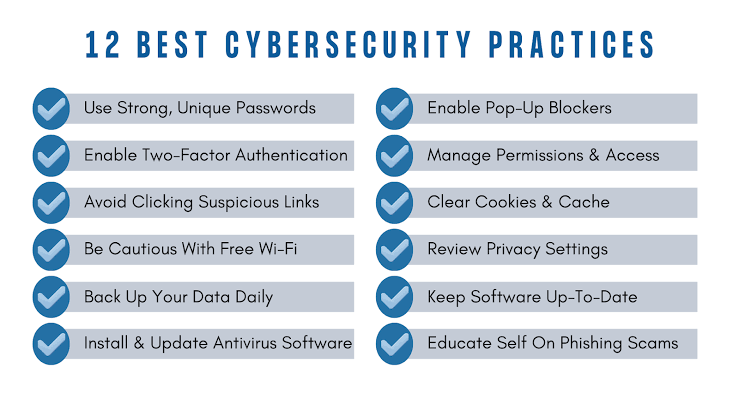
From using stronger passwords to recognizing suspicious messages, these simple digital security tips can help anyone become safer online.
Use Strong and Unique Passwords
Passwords are still one of the most important parts of online security.
Unfortunately, many people use passwords that are easy to guess or reuse the same password across multiple websites.
This creates a serious problem.
If one website experiences a data breach and your password is exposed, criminals may try that same password on other websites.
Using a unique password for every important account limits the damage if one password is compromised.
Strong passwords should generally be long, difficult to guess, and not based on easily available personal information.
Avoid using obvious combinations involving your name, birthday, pet, favorite sports team, or other information that someone could discover online.
A password manager can make this much easier by generating and storing unique passwords for your accounts.
Turn On Multifactor Authentication
A strong password is important, but it shouldn’t be your only line of defense.
Multifactor authentication, often called MFA, adds another verification step when you sign in.
Depending on the service, this might involve an authentication application, security key, biometric verification, or another method.
The advantage is simple: if someone obtains your password, they may still be unable to access your account without the additional authentication factor.
Enable MFA on your most important accounts first, especially email, banking, cloud storage, social media, and work accounts.
Keep Your Software Updated
Software updates aren’t just about adding new features.
They often include security fixes for vulnerabilities that attackers could otherwise exploit.
This applies to your:
- Smartphone
- Computer
- Web browser
- Applications
- Router
- Smart devices
- Security software
When your device tells you that an important security update is available, don’t ignore it indefinitely.
Enable automatic updates when appropriate so that security patches can be installed without requiring you to remember every update manually.
Keeping software current is one of the easiest ways to improve digital security.
Learn to Recognize Phishing
Phishing is one of the most common ways criminals attempt to steal information.
A phishing message may appear to come from a bank, delivery company, employer, government agency, social media platform, or another trusted organization.
The message may ask you to click a link, open an attachment, confirm your identity, make a payment, or provide a password.
The most important thing to remember is that appearances can be misleading.
A professional-looking message can still be fraudulent.
Be cautious when a message creates a strong sense of urgency.
Phrases such as “your account will be closed today” or “immediate action required” are often designed to make people react before they think.
Instead of clicking a link in an unexpected message, visit the organization’s official website directly or contact it through a trusted channel.
Don’t Share Verification Codes
One of the simplest security rules is also one of the most important:
Never share a verification code simply because someone asks for it.
Criminals may impersonate bank employees, technical-support representatives, friends, coworkers, or other trusted people.
They may claim that they need a code to verify your identity or protect your account.
In reality, they may be attempting to use the code to sign into your account.
Treat authentication codes like passwords.
If someone asks for one unexpectedly, stop and verify the request independently.
Protect Your Email Account
Your primary email account deserves special attention.
Many online accounts use email for password recovery.
If a criminal gains access to your email, they may potentially use password-reset links to gain access to other accounts.
Your email inbox may also contain sensitive information, including financial documents, purchase confirmations, personal conversations, work information, and account details.
Use a unique password and multifactor authentication for your primary email account.
Review recent login activity if your email provider offers that feature.
Also make sure your account recovery information is current.
Be Careful With Links
Not every link is dangerous, but unexpected links deserve caution.
Before clicking a link in an email, text message, social media post, or private message, think about why you received it.
If you aren’t expecting the message, don’t automatically trust it.
Scammers can use shortened links, misleading text, fake websites, and lookalike domains to make malicious destinations appear legitimate.
When accessing important services such as banking or email, it’s often safer to open the official app or type the website address yourself rather than following an unexpected link.
Be Careful With Attachments
Malicious files can be disguised as ordinary documents, invoices, photographs, shipping information, or other files.
If someone sends you an unexpected attachment, don’t open it immediately.
This is especially important when the message creates urgency or asks you to enable unusual features.
If you weren’t expecting the file, verify that it was actually sent by the person or organization before opening it.
Download Apps From Trusted Sources
Applications can provide useful features, but malicious software can also be disguised as legitimate apps.
Whenever possible, download applications from official app stores or directly from reputable software providers.
Avoid downloading unknown programs from suspicious websites.
Be especially careful with applications that promise to provide free access to paid services, unlock restricted features, or offer unusually attractive benefits.
If something sounds too good to be true, it may be designed to get you to install unwanted software.
Review App Permissions
When you install an application, it may request access to various features on your device.
Some permissions make sense for the application’s purpose.
Others may not.
For example, a simple application may not need access to your contacts, microphone, location, or photographs.
Review permissions regularly and remove access that an application doesn’t need.
If an app requests excessive permissions without a clear reason, consider whether you actually need it.
Secure Your Smartphone
Your smartphone contains a huge amount of personal information.
It may have your email, photographs, banking apps, social media accounts, contacts, messages, and authentication tools.
Protect it with a strong screen lock.
Use biometric authentication when appropriate.
Install security updates promptly.
Avoid leaving your phone unlocked in public places.
Also enable device-finding and remote-wipe features when available.
These features can be extremely useful if your phone is lost or stolen.
Secure Your Home Wi-Fi
Your home network connects many of your devices to the internet.
This may include computers, smartphones, televisions, gaming consoles, cameras, printers, and smart home devices.
Start by changing the default administrator password on your router.
Use a strong Wi-Fi password and modern wireless security settings supported by your router.
Keep the router’s firmware updated when updates are available.
If your router supports a separate guest network, consider using it for visitors and devices that don’t need access to your primary network.
Be Careful on Public Wi-Fi
Public Wi-Fi can be convenient in airports, hotels, restaurants, libraries, and other locations.
However, you should be cautious when using unfamiliar networks.
Avoid conducting highly sensitive activities on networks you don’t trust, particularly if your device or the network has unusual security warnings.
Make sure your device’s operating system and browser are updated.
When accessing sensitive accounts, use trusted connections and appropriate security protections.
Back Up Important Files
Imagine losing your phone or computer tomorrow.
Would you still have your photographs, documents, work files, and other important information?
Backups provide an additional layer of protection.
They can help you recover from device failure, accidental deletion, ransomware, theft, or other problems.
Important files should exist in more than one location.
For particularly valuable information, consider maintaining backups that aren’t continuously connected to the device.
The most important thing is to make backups regularly and verify that important files can actually be restored.
Be Careful What You Share Online
Personal information can be surprisingly valuable to cybercriminals.
Think carefully before publicly sharing details such as your full birth date, home address, phone number, travel plans, workplace information, or daily routine.
Social media posts can reveal more than you realize.
A photograph might show a home address, school name, location, document, vehicle information, or other sensitive details in the background.
Review your privacy settings and consider limiting who can see personal information.
Watch Out for Social Engineering
Cybersecurity isn’t only about technology.
Attackers frequently manipulate people rather than trying to break through technical defenses.
This is known as social engineering.
A criminal might pretend to be a bank employee, government official, coworker, delivery driver, family member, or technical-support representative.
They may use fear, urgency, authority, or sympathy to convince you to act.
The best defense is to slow down.
If someone asks you to send money, reveal a password, provide a verification code, install software, or change account settings, verify the request independently.
Don’t Trust Caller ID Completely
Caller ID can be useful, but it shouldn’t be treated as absolute proof of identity.
Scammers can use techniques that make a call appear to come from a familiar number or organization.
If someone calls unexpectedly and asks for sensitive information, don’t assume the call is legitimate simply because the number looks familiar.
Hang up and contact the organization using a trusted phone number from its official website, your account statement, or another reliable source.
Monitor Your Financial Accounts
Regularly checking your financial accounts can help you notice suspicious activity quickly.
Look for transactions you don’t recognize.
Pay attention to account notifications and alerts.
Many financial institutions allow customers to receive notifications when certain transactions occur.
These alerts can provide an early warning if someone attempts to use your account without permission.
If you notice an unfamiliar transaction, contact your financial institution through an official communication channel.
Secure Your Online Shopping Accounts
Online shopping accounts may contain personal information, addresses, purchase histories, and stored payment details.
Use unique passwords for these accounts and enable MFA where available.
Be cautious about storing payment information on unfamiliar websites.
Before purchasing from a new online store, research the business and check whether the website appears legitimate.
Don’t allow an extremely low price or urgent “limited-time” offer to pressure you into making a purchase without checking the seller.
Delete Accounts You No Longer Use
Old accounts can become forgotten security risks.
You may have created accounts years ago and stopped using them.
If those accounts still contain personal information and have weak or outdated passwords, they could potentially be compromised.
Review your online accounts periodically.
Delete accounts you no longer need when possible.
For accounts you need to keep, update your security settings and use a unique password.
Be Careful With Browser Extensions
Browser extensions can be useful, but they can also introduce privacy and security risks.
Only install extensions you genuinely need.
Review the permissions requested by each extension.
If an extension asks for broad access to websites, browsing information, or other sensitive data, consider whether the functionality is worth the risk.
Remove extensions you no longer use.
Keeping your browser and extensions updated can also help reduce security problems.
Don’t Ignore Security Warnings
Modern browsers, operating systems, and security applications can detect potentially dangerous websites, downloads, applications, and connections.
When you see a security warning, don’t automatically dismiss it.
Take a moment to understand what the warning means.
If you’re unsure, leave the website or cancel the download and investigate further.
Security warnings exist because something about the activity may be unsafe.
Ignoring them repeatedly can eventually lead to a successful attack.
Be Skeptical of Unbelievable Offers
Scammers often use attractive offers to get people’s attention.
You might receive a message claiming you’ve won a prize, been selected for a special opportunity, or received an unexpected refund.
The offer may require you to provide personal information, pay a fee, click a link, or send money.
Before responding, ask yourself whether the opportunity makes sense.
If you don’t remember entering a competition, be skeptical about messages claiming you’ve won one.
If someone promises guaranteed financial returns, investigate carefully before doing anything.
Protect Your Children Online
Children are increasingly active online, which makes digital security an important family issue.
Teach children not to share passwords, home addresses, school information, or other sensitive details with strangers.
Explain that people online aren’t always who they claim to be.
Encourage children to tell a trusted adult if someone makes them uncomfortable or asks for unusual information.
Parents should also understand the privacy and security settings of the platforms their children use.
The goal isn’t simply to restrict internet access.
It’s to help young people develop safe digital habits.
Create a Simple Security Routine
Digital security becomes easier when it becomes part of your normal routine.
You don’t need to spend hours every week thinking about cybersecurity.
A simple routine can include checking for important software updates, reviewing account activity, deleting unused applications, checking important account settings, and making sure backups are working.
Every few months, review your most important accounts.
Ask yourself:
Are my passwords unique?
Is MFA enabled?
Are my recovery details current?
Do I still recognize the devices connected to my account?
Are there applications or services I no longer use?
These simple checks can help identify problems before they become serious.
What to Do If Something Goes Wrong
Even careful internet users can experience security incidents.
If you think an account has been compromised, act quickly.
Change the password using a trusted device.
Enable multifactor authentication.
If the password was reused elsewhere, change it on those accounts too.
Review recent login activity and look for unfamiliar devices or changes.
If financial information may have been compromised, contact your financial institution through an official channel.
If your device may contain malware, disconnecting it from networks while you investigate can help limit unwanted communication.
Don’t be embarrassed about reporting a scam or security incident.
Cybercriminals rely on victims staying silent.
Small Habits Can Make a Big Difference
Good digital security doesn’t require complicated technology.
In many cases, the most effective protections are simple habits repeated consistently.
Think before clicking.
Use unique passwords.
Enable MFA.
Update your devices.
Back up important files.
Protect your email account.
Be cautious about unexpected requests.
Limit personal information shared publicly.
Verify someone’s identity before sending money or sensitive information.
These actions may take only a few minutes, but they can make it much harder for criminals to succeed.
Conclusion
Digital security can seem overwhelming because new cyber threats appear all the time.
However, protecting yourself online doesn’t have to be complicated.
Start with the fundamentals.
Create strong, unique passwords and use a password manager if helpful. Enable multifactor authentication on important accounts. Keep your software and devices updated. Be cautious with links, attachments, applications, and unexpected messages.
Protect your smartphone, home Wi-Fi network, email account, and important files.
Think carefully before sharing personal information online, and remember that criminals often use social engineering to manipulate people rather than attacking technology directly.
Most importantly, slow down when something feels urgent or unusual.
A message telling you that your account will be closed in minutes, a caller demanding immediate payment, or a friend suddenly asking for money should all prompt you to verify before acting.
Digital security isn’t about being perfect. It’s about building simple habits that reduce your risk and make it harder for cybercriminals to take advantage of you.
The internet will continue to play an important role in everyday life. By making security part of your everyday digital routine, you can enjoy the benefits of technology while doing much more to protect your information, accounts, devices, and digital identity.