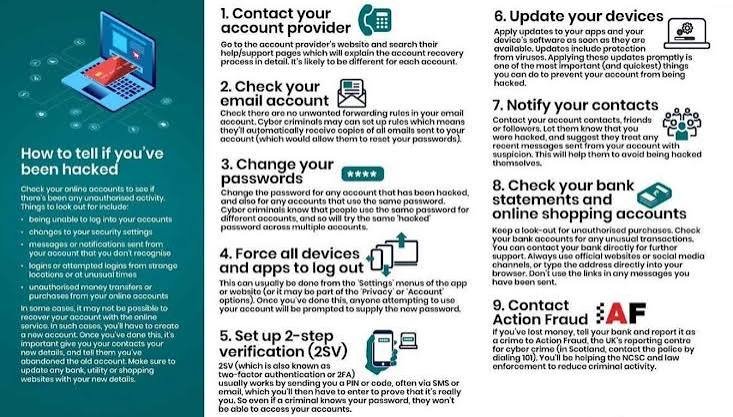
Realizing that someone may have accessed your online account can be frightening.
You might notice a login from a location you don’t recognize, receive a password-reset email you didn’t request, see messages you never sent, or discover changes to your account that you didn’t make.
It is easy to panic when something like this happens.
However, staying calm and taking the right steps can help limit the damage.
An unfamiliar notification doesn’t always mean your account has been hacked. Sometimes it can be caused by a new device, an old session, a VPN, a travel location, or another harmless explanation.
But if you notice several unusual signs or believe your credentials have been exposed, it’s important to act quickly.
The most important thing is to secure the affected account, protect other accounts that may be connected to it, and monitor your information for additional problems.
Don’t Panic
The first step is simple: don’t panic.
Cybersecurity problems can feel overwhelming, but many account-security incidents can be addressed by taking a series of practical steps.
Avoid responding to suspicious messages telling you that your account has been compromised.
Instead, access the account directly through its official website or application.
Don’t click a security link included in an unexpected email or text message.
Look for Signs of Unauthorized Access
Before taking action, identify what seems unusual.
Possible warning signs include:
- A password suddenly stops working.
- You receive an unexpected login notification.
- A new device appears in your account.
- You receive a password-reset message you didn’t request.
- Messages are sent from your account without your knowledge.
- Social media posts appear that you didn’t create.
- Your account information has changed.
- You notice unfamiliar purchases.
- New applications are connected to your account.
- Recovery information has been changed.
One unusual event isn’t always proof of a compromise.
But several unexpected changes deserve immediate attention.
Access Your Account Directly
If you still have access to the account, don’t use links from suspicious messages to sign in.
Open the official application or type the website address yourself.
This helps prevent you from accidentally entering your credentials into a fake login page.
If you have the official app installed, using it can be a convenient way to check your account.
Change Your Password Immediately
If you believe someone may know your password, change it.
Create a new, strong, unique password.
Don’t use a password that you have used for another account.
If you use a password manager, allow it to generate a new password for you.
Changing the password can prevent someone from continuing to use stolen credentials.
Change Reused Passwords
This step is especially important.
If you used the same password on other websites, change those passwords too.
For example, suppose the compromised account used the same password as your shopping account, social media account, and another service.
Changing only the compromised account leaves the others exposed.
Use a different password for every important account.
Secure Your Email Account
If the compromised account isn’t your email account, pay special attention to your email anyway.
Email is often used for password resets and account recovery.
If someone gains access to your email, they may be able to take control of other accounts.
Make sure your email account has a strong, unique password and multifactor authentication.
Review its login activity and connected devices.
Enable Multifactor Authentication
Once you’ve secured the password, enable multifactor authentication if the service supports it.
MFA adds another layer of protection.
Depending on the service, it may involve an authentication application, security key, biometric confirmation, or another verification method.
If a criminal has your old password, MFA can make it more difficult for them to sign in again.
Check Your Account Recovery Information
Attackers who gain access to an account may attempt to change recovery information.
Check the recovery email address and phone number.
Make sure they belong to you and are still secure.
Look for other recovery options you don’t recognize.
If something has been changed without your permission, correct it.
Review Connected Devices
Many online services show the devices currently signed into an account.
Review the list.
Look for phones, computers, browsers, or other devices you don’t recognize.
Sign out unfamiliar sessions where possible.
If you’re unsure about an old session, signing out and logging back in from your trusted device can be a sensible precaution.
Review Recent Login Activity
Check the account’s security or login history.
Look for unfamiliar locations, devices, or times.
Remember that login locations aren’t always precise.
Mobile networks, VPNs, travel, and internet-service providers can sometimes make the displayed location appear different from your actual location.
Focus on the overall pattern rather than one location alone.
Remove Unknown Third-Party Applications
Some services allow other applications to connect to your account.
If an attacker gained access, they may have added an application or authorized a service.
Review connected applications.
Remove anything you don’t recognize or no longer need.
Be careful not to remove legitimate services you rely on without understanding what they do.
Check Your Messages
If someone accessed your email or social media account, they may have sent messages to other people.
Review recent sent messages.
Look for messages you didn’t write.
If you find suspicious activity, tell affected contacts that your account may have been compromised.
This can prevent them from trusting malicious links or requests sent from your account.
Check Your Posts and Profile
Social media accounts may be changed by unauthorized users.
Look for:
- Posts you didn’t create
- Comments you didn’t write
- New profile information
- Unfamiliar followers or accounts
- Messages you didn’t send
- Changes to privacy settings
Remove unauthorized content where possible.
Secure the account before spending too much time cleaning up the profile.
Check Your Financial Activity
If the compromised account contains payment information, review your financial activity.
Look for unfamiliar purchases, transfers, subscriptions, or other transactions.
If you see something suspicious, contact your bank, card provider, or financial institution through an official channel.
Don’t use contact information provided in a suspicious message.
Remove Saved Payment Information When Appropriate
If an online shopping account has been compromised, consider removing saved payment information after securing the account.
This can reduce the risk of unauthorized purchases.
However, changing passwords and securing the account should remain a priority.
Look for Password-Reset Emails
Check your email for password-reset notifications you didn’t request.
These can provide clues about which accounts someone may have attempted to access.
Don’t click links inside suspicious messages.
Instead, go directly to the relevant service and check its security settings.
Be Careful With Unexpected Support Calls
After an account compromise, you may receive additional scam attempts.
Someone may contact you claiming to be security support.
They might say they can help recover your account.
They could ask for your password, authentication code, payment information, or remote access to your computer.
Don’t automatically trust someone because they know that you experienced an account problem.
Contact the company through its official support channel.
Never Give Anyone Your Authentication Code
If someone asks you for a code sent to your phone or authentication application, don’t provide it.
An attacker may already have your password and simply needs the verification code to complete the login.
Treat authentication codes as private.
Scan Your Device if Necessary
If you suspect that malware or another malicious program may be involved, use reputable security software and follow the security guidance appropriate for your device.
Keep your operating system and security tools updated.
Don’t download random “cleaner” programs because a pop-up claims that your device is infected.
Use trusted sources.
Update Your Device
If you suspect that your account was compromised through a device, make sure the device is updated.
Install available security updates for your operating system, browser, and applications.
Updates can address known vulnerabilities and improve security.
Review Your Installed Applications
Look through your applications and programs.
If you notice something unfamiliar, investigate it.
Don’t automatically assume every unknown application is malicious, because some legitimate software may have unfamiliar names.
However, programs you don’t recognize deserve attention.
Secure Your Other Important Accounts
Once you’ve secured the compromised account, think about what else could be affected.
Ask yourself:
- Does this account have access to my email?
- Does it contain payment information?
- Is it connected to other services?
- Did I reuse the same password elsewhere?
- Can it reset another account?
- Does it contain sensitive documents?
Use the answers to determine which accounts need attention first.
Prioritize Your Email and Financial Accounts
If you’re short on time, start with the accounts that could cause the greatest harm if compromised.
Usually, these include your primary email and financial accounts.
Secure those first.
Then move to social media, cloud storage, shopping accounts, and other important services.
Check Your Cloud Storage
If an account connected to cloud storage was compromised, review your files and sharing settings.
Look for unexpected file changes.
Check shared folders.
Review access permissions.
Remove unfamiliar people or applications.
If sensitive documents were stored there, consider whether they may have been exposed.
Review Privacy Settings
An attacker may change privacy settings after gaining access.
Review who can see your information.
Check profile visibility.
Review location sharing.
Look at connected services.
Restore settings to your preferred configuration.
Warn Your Contacts
If your account sent suspicious messages, tell your contacts.
Keep the message simple.
Let them know that messages from your account may have been unauthorized and that they should avoid clicking unexpected links or responding to unusual requests.
This can help prevent the compromise from spreading.
Don’t Delete Evidence Too Quickly
If you believe the incident is serious, preserve relevant information before deleting everything.
Keep suspicious emails, login notifications, screenshots, transaction records, and other useful details.
These records may help you understand what happened or assist with reporting the incident.
Contact the Service Provider
If you cannot regain control of your account or believe it has been seriously compromised, use the service’s official account-recovery or support process.
Go directly to the company’s website or official application.
Avoid searching for a random phone number from an unexpected message.
Scammers sometimes create fake support pages specifically to target people who are already dealing with an account problem.
Report Financial Fraud Quickly
If money was stolen or payment information was misused, contact your financial institution as soon as possible.
Use an official phone number, website, or application.
Explain what happened and follow the institution’s instructions.
The faster you report suspicious financial activity, the sooner appropriate protective measures can begin.
Consider Whether Personal Information Was Exposed
An account may contain more than a password.
Think about what information was stored there.
Could someone have accessed your:
- Address
- Phone number
- Date of birth
- Private photographs
- Identification documents
- Financial information
- Work information
- Private conversations
If highly sensitive information was exposed, consider what additional protective steps may be appropriate.
Change Security Questions if Necessary
If the service uses security questions for account recovery, review them.
Avoid answers that are easily discovered through social media or public information.
Where possible, use stronger recovery methods.
Don’t Reuse Your Old Password
After an account has been compromised, don’t simply make a small variation of the old password.
Create something genuinely different.
A password manager can generate a strong replacement.
Watch for Follow-Up Scams
Once criminals know that someone has experienced an account problem, they may attempt another scam.
You might receive messages claiming to offer account recovery or security assistance.
Treat unexpected offers with caution.
Attackers sometimes use one incident to create opportunities for additional fraud.
Monitor Your Accounts Afterward
Don’t assume the problem is completely solved immediately after changing your password.
Keep an eye on the account for several days or weeks.
Watch for:
- New login alerts
- Password-reset messages
- Unexpected purchases
- Unknown devices
- Suspicious messages
- Changes to account settings
If anything unusual appears, investigate it.
Consider Whether Other Accounts Are at Risk
Think about how the compromised account connects to your digital life.
If your email was compromised, review accounts that use that email for password recovery.
If a shopping account was compromised, review payment information.
If social media was compromised, review connected applications.
If cloud storage was compromised, check shared documents.
The goal is to understand the wider impact rather than focusing on only one account.
What If You Can’t Log In?
If the attacker changed your password or recovery information, you may no longer be able to sign in.
Don’t create another account and assume the problem will disappear.
Use the service’s official account-recovery process.
Provide the requested information.
Follow the provider’s instructions carefully.
Be wary of people online who claim they can recover your account for money.
Don’t Pay Random “Account Recovery” Services
People who have lost access to an account can become targets for secondary scams.
Someone may promise to hack your account back or recover it instantly for a fee.
Be extremely cautious.
Use the service’s official recovery process instead.
Secure Your Devices Too
An account compromise may be connected to a compromised device.
Make sure your phone and computer are protected.
Update the operating system.
Review installed software.
Use security tools available for your device.
Remove applications you don’t need.
Change important passwords from a trusted device if you suspect the original device may be unsafe.
Think About How the Attack Happened
After securing everything, consider how the problem may have started.
Was the password reused?
Did you click an unexpected link?
Did you install an unfamiliar application?
Did you share a verification code?
Did someone have physical access to your device?
Understanding the likely cause can help prevent the same problem from happening again.
Build Better Security Habits
Use the incident as an opportunity to improve your overall security.
Create unique passwords.
Use a password manager.
Enable MFA.
Keep devices updated.
Be careful with unexpected messages.
Review connected applications.
Monitor important accounts.
These habits can reduce the likelihood of future problems.
A Simple Account Recovery Checklist
If you think your account has been hacked, work through these steps:
- Stay calm and avoid suspicious messages.
- Access the account directly through its official website or app.
- Change the password.
- Change reused passwords on other accounts.
- Enable multifactor authentication.
- Check recovery information.
- Review login activity.
- Remove unfamiliar devices.
- Revoke unknown third-party access.
- Check messages and posts for unauthorized activity.
- Review financial transactions if relevant.
- Secure your email account.
- Update your devices and applications.
- Contact official support if you can’t regain access.
- Monitor the account afterward.
Prevention Is Easier Than Recovery
Dealing with a compromised account can take time.
Fortunately, many preventative measures are straightforward.
Use unique passwords.
Enable MFA.
Keep software updated.
Avoid suspicious links.
Don’t share authentication codes.
Review account activity.
Protect your email.
These steps can significantly improve your overall account security.
Conclusion
Thinking that your account has been hacked can be stressful, but you don’t have to handle the situation blindly.
Start by staying calm.
Access the account through its official website or application.
Change the password and make sure it isn’t reused elsewhere.
Enable multifactor authentication.
Review login activity, connected devices, recovery information, and third-party applications.
Check financial activity if payment information may have been involved.
Secure your other important accounts, especially your email.
If you can’t regain access, use the service’s official recovery process.
Most importantly, don’t let a security incident turn into another scam. Be cautious of anyone who unexpectedly offers to recover your account, asks for authentication codes, or requests remote access to your device.
The faster you respond and the more carefully you work through the problem, the better your chances of limiting the impact.
Once the immediate issue is resolved, take some time to understand how it happened and strengthen your security.
A compromised account can be a valuable lesson. With unique passwords, multifactor authentication, updated devices, careful browsing habits, and regular account monitoring, you can make your digital life considerably harder for attackers to disrupt.